AntiVisionWorkflow
Design a journal prompt people can answer in their own words
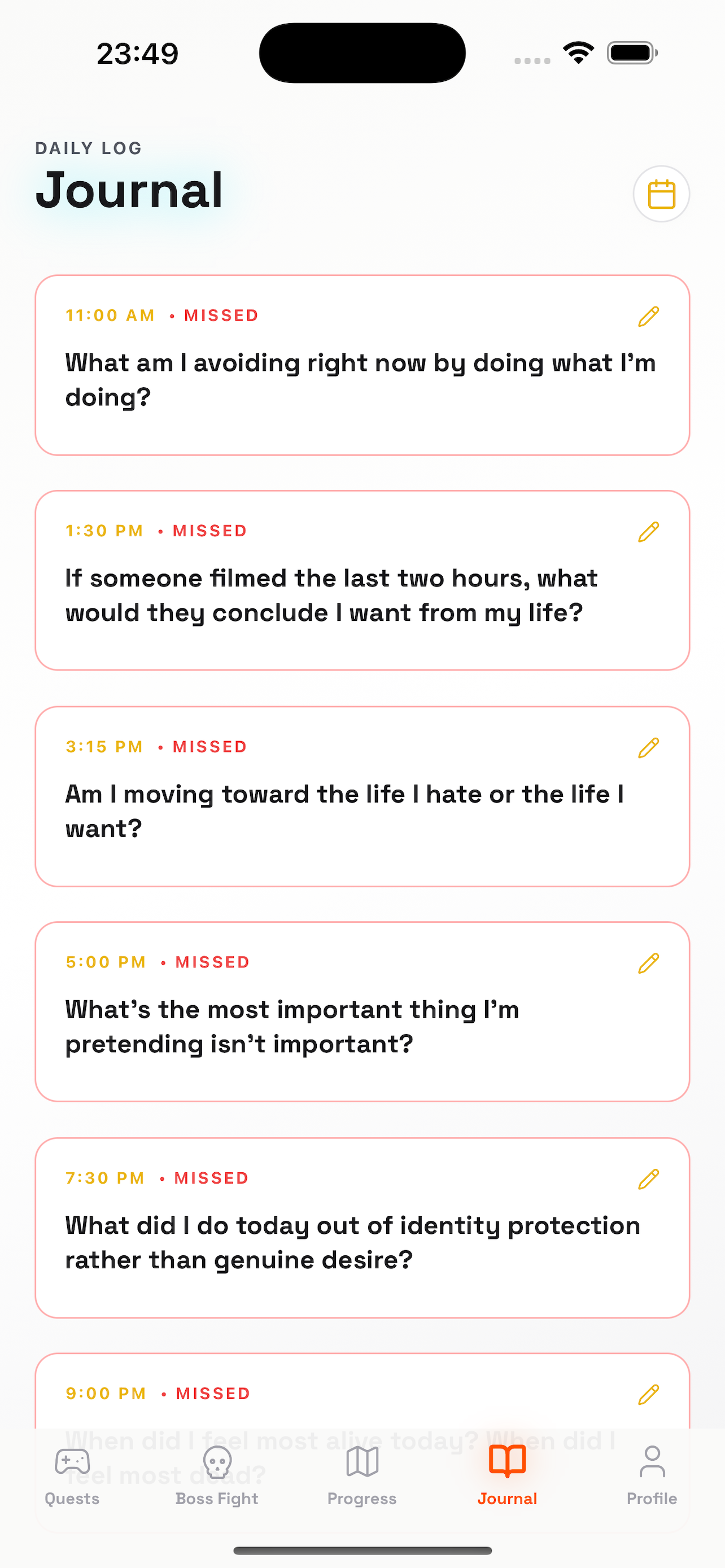
A journal prompt should give someone enough direction to begin while leaving room for their own words. AntiVision includes a reflective journal, which gives our mobile work a concrete product context. For a client application, we design the prompt, writing surface, saved-state feedback and return journey together, with personal entries handled according to the product's explicit data choices.
Write prompts that invite a usable answer
Choose a prompt with one clear purpose and avoid requiring the user to answer several questions at once. Let people skip, shorten or reinterpret a prompt where the product permits it. The interface should accommodate a sentence as comfortably as a longer entry. Copy testing can reveal whether a question feels clear, judgmental or unnecessarily demanding.
Test the wording aloud and in the context where the person will encounter it. A prompt presented at the end of a busy day should not require a long conceptual explanation before writing can begin. Avoid implying that there is a correct emotional response. Offer enough context to understand the question and enough space to answer differently. If the app rotates prompts, give content owners a way to review repetition and the order in which related questions appear.
Make writing and saving understandable
People should know whether their latest words are retained when they leave the screen. Define local persistence and synchronization separately if both exist. Give saved-state feedback without interrupting writing, and handle keyboard movement, long text and accessibility settings carefully. A journal surface should protect attention while still making the record's state unambiguous.
Define the save contract visibly. If edits are stored locally immediately but synchronized later, represent those outcomes separately. Protect text when the keyboard closes, the app is interrupted or the user changes orientation. For longer entries, preserve cursor position and avoid unexpected scrolling while saving. A subtle saved indicator is useful when it refers to a real durable state; an animation alone should not imply that the latest words will survive an app restart.
Preserve agency when an entry is unfinished
A person may abandon an entry, return much later or decide it should be deleted. Define drafts, intentional deletion and recovery behavior before adding reminders. Avoid exposing unfinished personal text in a notification preview. The proposed app should explain which actions are reversible and what happens when an entry is edited after it was included in another view.
Use separate actions for leaving a draft and deleting an entry. A person who closes the writing screen may intend to continue later, not discard it. Decide whether deletion offers undo and what that means when synchronization has already occurred. Keep reminders from exposing unfinished text. If an entry is linked to a goal or challenge, explain whether removing it affects that connection or any displayed progress, so a private writing decision does not have surprising effects elsewhere.
Choose privacy behavior before adding analytics
Journal text can include information about the writer and other people. Decide where it is stored, whether it is transmitted and which service identities can access it. Product analytics can measure navigation without copying entry contents. Review backup, export and deletion as separate paths; a general statement that a journal is private is not a technical specification.
Map the journal's storage options explicitly: device storage, account synchronization, backups and exports. Each has different implications for recovery and access. Avoid claiming end-to-end encryption or exclusive device storage unless the implementation provides it. Support requests should not automatically include entry contents. If diagnostic examples are needed, offer a controlled process that lets the person understand what is shared. The privacy design should address other people mentioned in entries as well as the account holder.
Evaluate comfort, control and reliable return
Test writing with the keyboard open, large text enabled and the app interrupted midway. Ask people to locate an earlier entry and explain whether the current one has saved. Measure lost text, mistaken deletion and difficulty finding controls. Avoid medical or therapeutic outcome claims unless the product has the appropriate purpose and supporting evidence.
Test writing sessions with short and long answers, large accessibility text and an interrupted save. Ask users to return to a prior entry, edit it and identify which version is current. Measure lost text and misunderstandings of save or deletion state. Content feedback should focus on clarity and freedom to answer, not claimed therapeutic benefit. A journal can be designed carefully without presenting ordinary reflection features as treatment or evidence of improved mental health.
- Test prompt wording for clarity and freedom to answer, including short entries and different localized interpretations.
- Distinguish durable local saving from later synchronization and verify text survives interruption and app restart.
- Explain drafts, deletion, undo and links to goals before a writing decision changes another part of the product.
- Keep entry contents out of routine analytics and define storage, export, backup and support access explicitly.
Build the journal around an explicit purpose
Bring the audience, prompt examples and the reason people will revisit their entries. We can scope writing, history, reminders and data controls as a coherent mobile experience. The quote should include content review and device testing, plus any account or synchronization work the product actually needs. These are proposed implementation choices, not claims about AntiVision's internal storage.
We can scope a journal around a defined use and a small set of reviewed prompts. The build can include drafting, saving, history, search where needed and data controls. Bring the expected return journey: daily reflection, project learning or another purpose may require different navigation. The quote should distinguish local-only behavior from account synchronization and specify recovery expectations. These are design decisions for the client's product rather than assumptions about AntiVision's internal implementation.
Inside the product
AntiVision
Follow the references
Sources & inspiration
Dream Actions
Devpost project by Rasheeda Robinson
Goals become daily actions.
This independently created project is credited as inspiration. The workflow and implementation guidance in this article are RDC’s analysis.
Put the guide to work
Start with your workflow.
Tell us what your team needs to do, which systems are involved and where the current process slows down.