ReportsDecision guide
Design reports that show each team the right data
A shared reporting platform should let each team answer its business questions within an approved data scope. Company boundaries, team responsibilities and export permissions need to remain consistent as users move from a summary to individual records. Design those boundaries as part of the reporting model, then test the actual views ordinary employees receive.
Define the audience and the decision for each report
List who uses the report, what they decide and which company or team data they need. A group-level executive view, a local operations dashboard and a manager’s team report may all use related data while requiring different detail. Document those differences instead of assuming that every person who can open the dashboard should see the entire underlying dataset.
Identify the business owner who approves access and the technical owner who implements it. Where employee or customer information is involved, have the organisation confirm the purpose and appropriate handling through its own responsible process. The report’s permission setting is a technical control, not a substitute for that decision. Keep the approval record and a review trigger so access can evolve deliberately when the report gains new fields or audiences.
Put company identity into the data model
A multi-company report needs reliable company identifiers on the records used for filtering and relationships. Similar customer names or shared product codes are not sufficient to establish ownership. Trace how company identity travels through source extraction, transformations and joined datasets. A missing identifier should have an explicit handling rule instead of inheriting a broad default that exposes the record to everyone.
Check joins across sources carefully. A customer identifier that is unique inside one company may not be unique across the group. If the reporting model ignores that boundary, it can combine unrelated records or reveal another company’s details. Build the relationships using the keys and scope agreed with source owners, then verify a selection of records that deliberately share names or local codes across different entities.
Enforce scope at retrieval, not only in navigation
A hidden tab or a preselected filter is not the same as access control. The data retrieval path must apply the authenticated user’s approved scope, including when a person follows a saved link or changes a request parameter. Treat convenience filters and mandatory access restrictions as different mechanisms so readers cannot remove the latter while exploring the report.
Use an explicit mapping from users or approved groups to company and team scope. Decide how changes become effective and what happens if the membership source cannot be read. Avoid continuing with unrestricted access merely because a lookup failed. Test users with one company, several companies and no approved membership, including the effect of a transfer while an earlier report session is still open.
Preserve the boundary through drill-down and exports
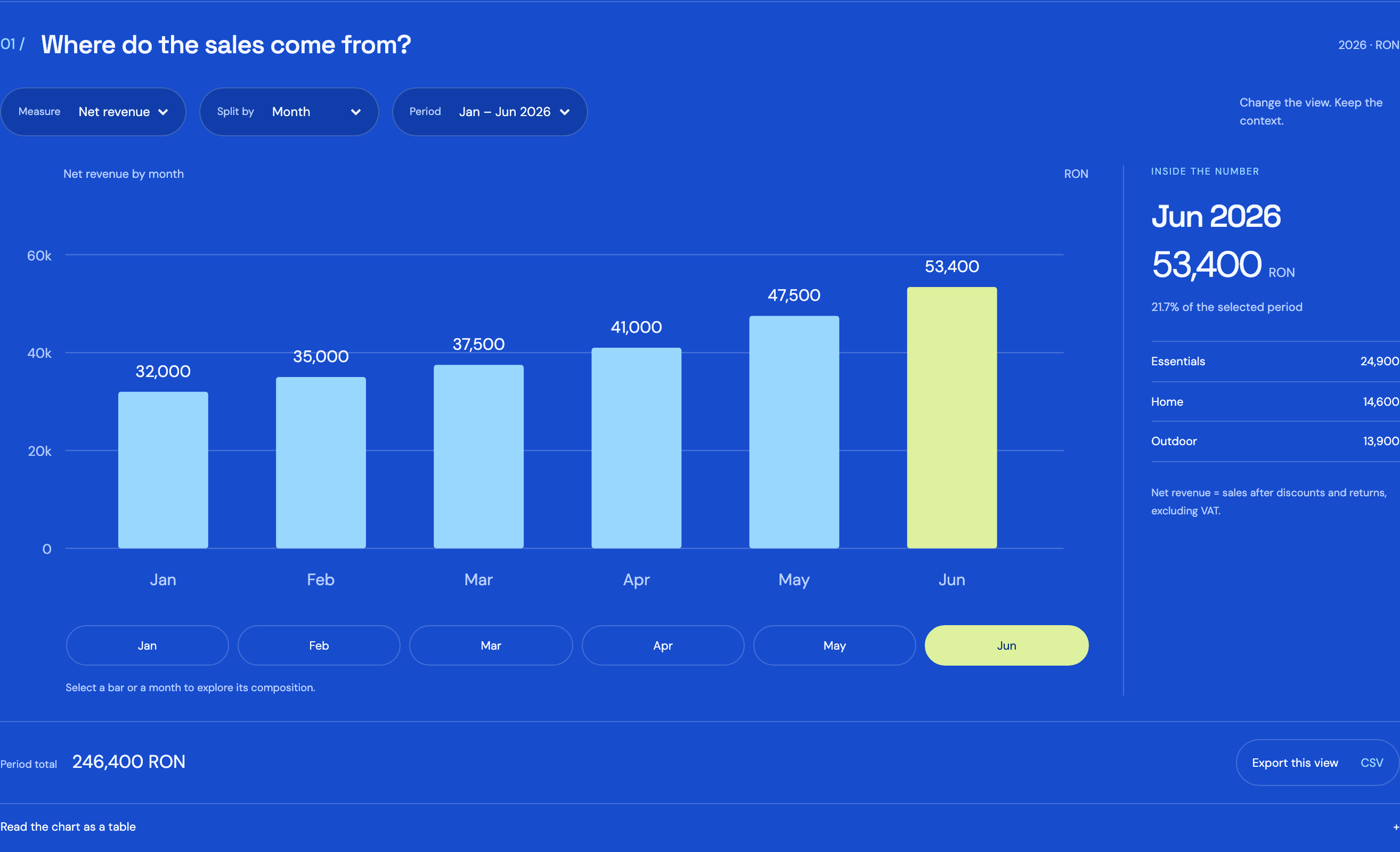
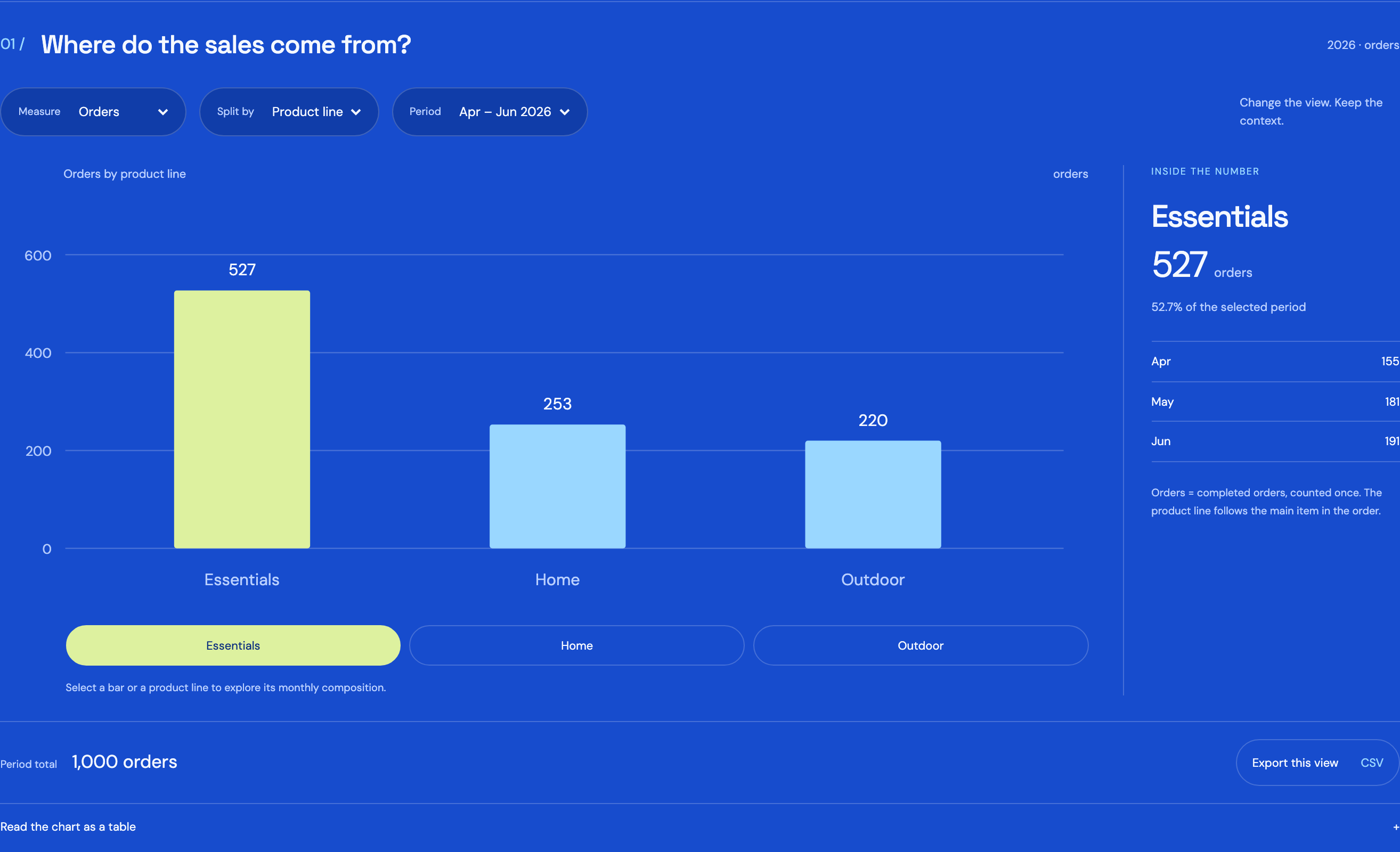
The summary, detail table and exported file must use the same approved scope. A total may look safe while its underlying drill-through reveals names or transactions the reader should not see. Review which fields appear at each level and whether small groups or combinations of filters reveal more detail than the intended audience needs.
Exports create a copy outside the interactive report, so define who can create them and what they contain. Check scheduled email delivery, shared links and downstream integrations as well. The checklist should be tested with ordinary accounts and specific records chosen to demonstrate both allowed and denied access.
- Verify company and team scope on the summary and detail views.
- Test saved links and direct requests for out-of-scope records.
- Check exported columns, rows and scheduled distribution lists.
- Review the effect of combined filters and small groups.
- Recheck access after membership changes and account removal.
Separate report maintenance from unrestricted data access
People maintaining calculations or refresh schedules may not need routine access to every business record. Define their privileges according to the work and the tool’s capabilities. Where elevated access is necessary, make the approval and duration explicit and record the relevant activity. Keep production data out of development copies unless its use has been deliberately authorised and scoped.
For EU-hosted or company-managed reporting, review access to extracts, backups, logs and storage as well as the dashboard. A carefully restricted page does not protect a broadly shared export folder. Include support providers and administrators in the responsibility map, and define how they investigate a failed refresh without receiving unnecessary personal or commercially sensitive content. Hosting location is one deployment choice within that wider operating model.
Make access tests part of report changes
Create a set of known user roles and test records covering company boundaries, team changes and restricted fields. Rerun the relevant checks when a new source, join, export or audience is introduced. A previously correct access rule can become incomplete when the data model grows, even if nobody deliberately changed the permission configuration.
RDC can build the reporting model, scope enforcement and repeatable access checks around your approved responsibilities. Measure unresolved access requests, stale memberships and discrepancies between screen and export behaviour. Assign an owner to review exceptions and remove access that no longer serves an approved purpose. Bring the existing report, company identifiers and role matrix to the discussion. They allow the team to design useful cross-company reporting while preserving clear boundaries from the first overview to the last downloaded row.
Inside the product
Reports
Follow the references
Sources & inspiration
AI Powered Auto CRM
Devpost project by Alejandro Capellán
Independent inspiration for workflow design.
This independently created project is credited as inspiration. The workflow and implementation guidance in this article are RDC’s analysis.
Put the guide to work
Start with your workflow.
Tell us what your team needs to do, which systems are involved and where the current process slows down.